


1. Log in to your cPanel account.
2. In the Domains section, click on Redirects.

3. Scroll down to the end of the page. Under Current Redirects, locate the domain and click on remove. 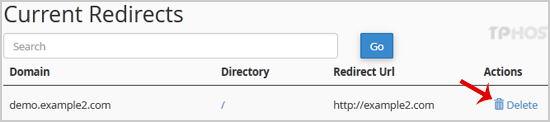
4. For confirmation, click on Remove Redirect once more. 


1. Log in to your cPanel account.
2. In the Domains section, click on Redirects.
3. Scroll down to the end of the page. Under Current Redirects, locate the domain and click on remove.
4. For confirmation, click on Remove Redirect once more.
0 أعضاء وجدوا هذه المقالة مفيدة (0 التصويتات)
الأكثر زيارة
The PowerHost offers reliable web hosting with 24/7 support and global data centers to keep your site online.